PLAIN-TEXT BASIC, RUN AGAINST DOCUMENTS THAT CANNOT STORE MACROS
No Microsoft Office required. The document's format stays as-is; only the contents are processed by machine. The source is plain text, so diffs are readable.
The tool and this page were both written by AI, then rendered and checked by AI. The evidence is in Visual QA and What is not verified.
u = oSheet.getCellByPosition(2, i).getValue()
q = oSheet.getCellByPosition(3, i).getValue()
oSheet.getCellByPosition(4, i).setValue(u * q)
total = total + u * q
| 1,280 | 40 | 51,200 | |
| 340 | 120 | 40,800 | |
| 95 | 500 | 47,500 | |
| 8,600 | 6 | 51,600 | |
| 720 | 80 | 57,600 | |
| Total | 248,700 |
For example, a situation like this.
“Fill in the amounts and total on this quote by end of day.
It arrives in the same format every month, so from next month on too.”
.xlsx. Not a single byte of macro inside.This request doesn't come together cleanly when the file you're handed is an .xlsx,
because an .xlsx cannot store macros by design (macros live in .xlsm).
It's not about whether you can write VBA; it's that there's nowhere to put what you wrote.
And all three ways out mean giving something up.
Convert to .xlsm. That changes their workflow, and often isn't accepted.
Fill in just the results. Can't re-run, no formulas left. If the numbers change, redo it.
Back to doing it by hand. Time grows with the sheet count and the months. Next month, the same.
None of the three is a technical limit. The reason it can't be done is written in the spec, so that's just where people tend to stop. What's stuck is the storage side, not the execution side.
It just can't be stored; that doesn't mean it can't run.
Inject the source into a Basic library at runtime, and the document is processed while staying an ordinary .xlsx.
# The source stays plain text, never embedded in the document
python basrun.py apply book.xlsx src MyLib Amount.FillAmounts --backup

# You can also rescue macros trapped in a document back to plain text
python basrun.py pull rescued Standard --book legacy.ods
The long way around turns out to be the better shape.
buried in the document's XML
effectively impossible
only formats that can hold macros
the document
git diff is readable
ordinary code review
.xlsx .pptx .docx alike
the source (library is a runtime cache)
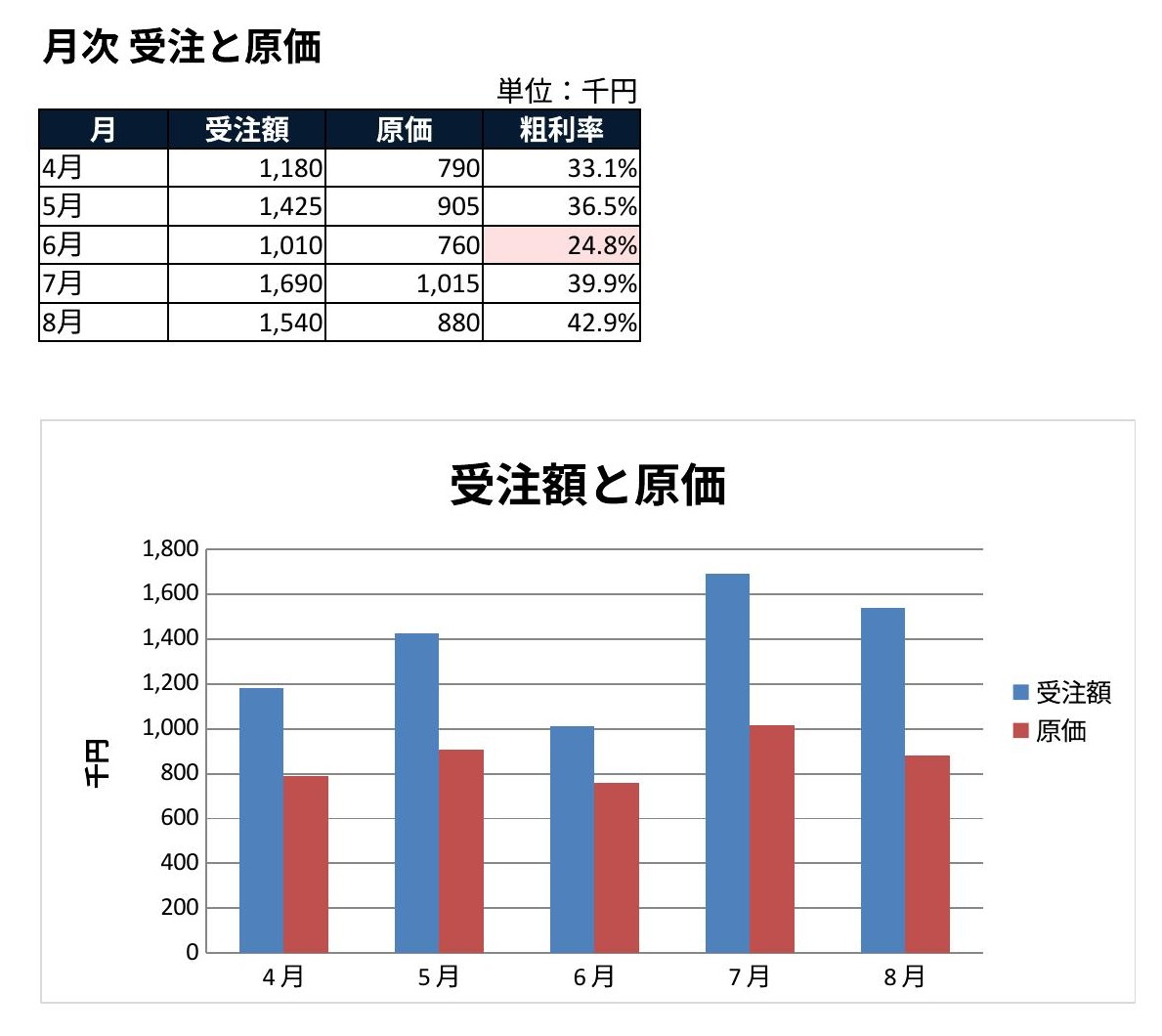
Another .xlsx: basrun filled the gross margins and % format; the chart and conditional formatting were set at generation. No Excel used.
A string being correct and the result being readable are two different things. Code that prints “it worked” prints it even when it didn't. So we render the result and confirm it with our eyes before calling it done.
Values alone can be read by dumping to CSV. But the moment it becomes CSV, merged cells, column widths, and sheet structure are lost. The coordinates survive as numbers, but how it looks does not. A chart has no textual form at all, so there's no way to confirm by re-reading whether it was drawn.
| Readable as text | Only visible when rendered | |
|---|---|---|
| Cells | values, formulas, coordinates | how a merge looks, text cut by column width |
| Formatting | the rules you set | the color those rules actually produced |
| Charts | the definition (XML) | whether it shows up at all |
I hit this for real. A chart's shape had no size written on it; the chart existed but its area was zero, meaning it was invisible. Ask, and it correctly answers “1 chart.” A method that checks for existence will never find this. I misread the cause three times running, and finally pinned it on the tool's limits: “this renderer doesn't support charts.” Wrong all three times. Only by rendering could I doubt my own output.
basrun, and this page too, were written by AI.
And the flaw above was found by that same AI, rendering and looking.
soffice, then to an image, then re-read.
The two images in this section, and the monthly sheet above, were all looked at once before being posted.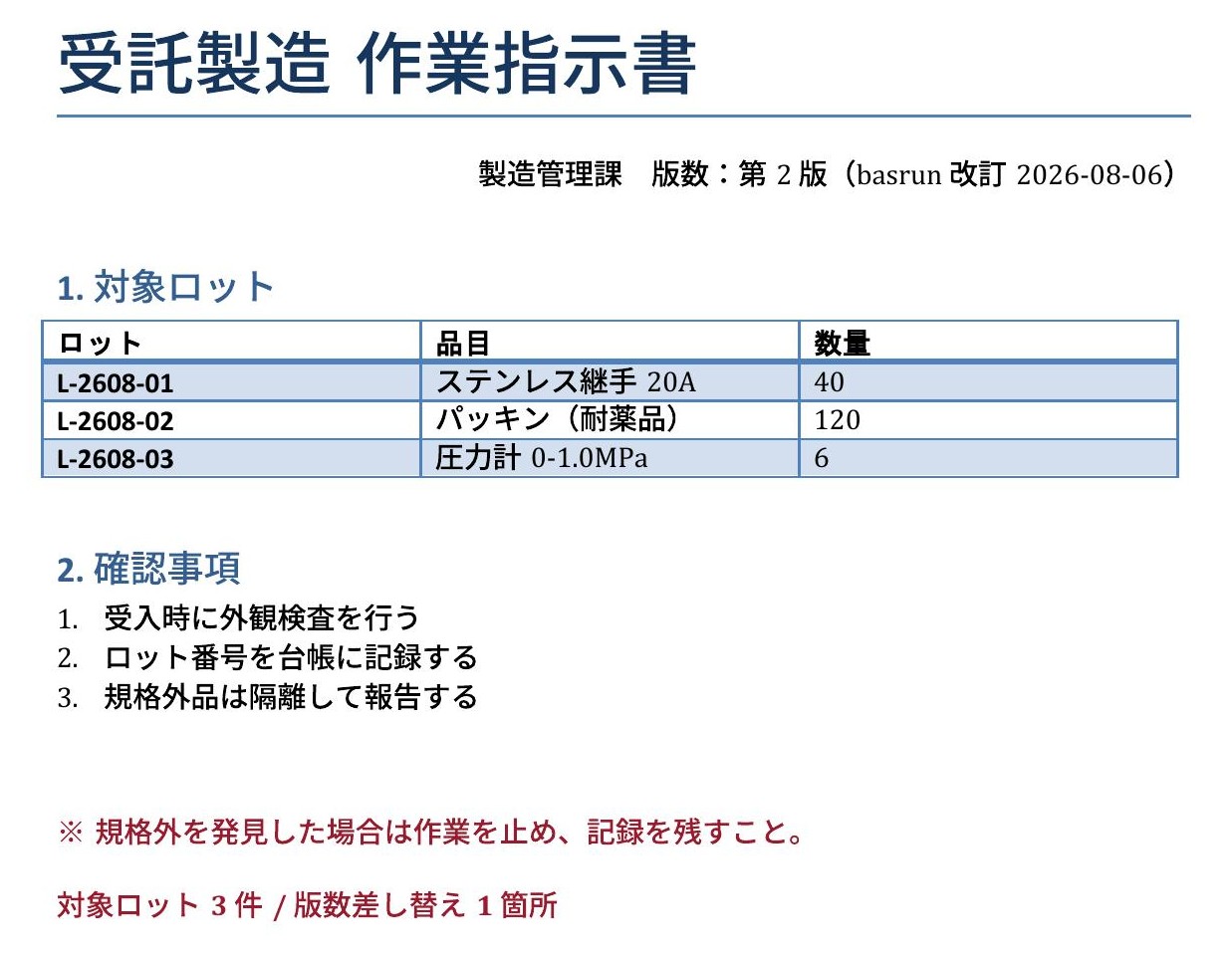
.docx: basrun swapped the revision number and appended the lot count
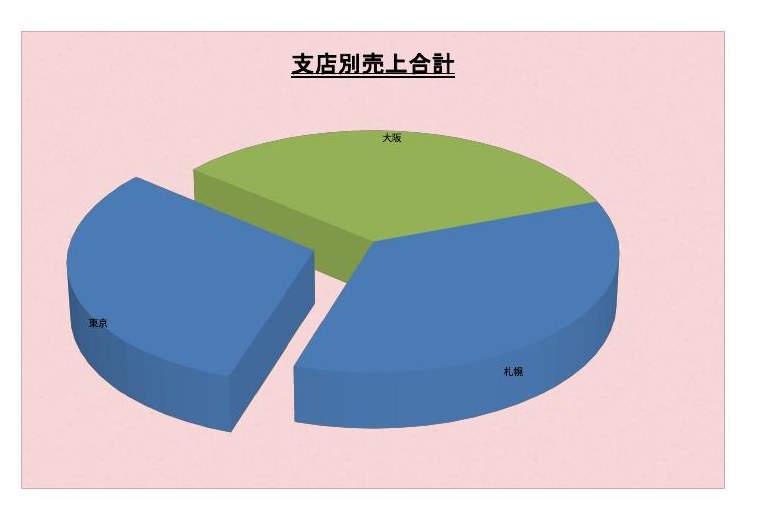
.xlsx: 3-D chart and texture. The domain you can't confirm without rendering
Perfectly correct as a string. A flaw re-reading will never surface.
Mapped the design-system colors by name and dropped the role of the panel it sat on.
Designed by width and never used the vertical dimension. Numerically a correct layout.
All you need is LibreOffice. No Microsoft Office required.
For Python, use the one bundled with LibreOffice (plain Python has no uno module).
The source is a plain .bas. Never embedded in the document, so it lives in git as-is.
Injected into a library at runtime, processed, and saved. The format stays .xlsx.
Not the “it worked” message; we confirm the result with our eyes before calling it done.
' ★ Receive the document as an argument. Don't rely on ThisComponent
Sub FillAmounts(oDoc As Object)
    Dim oSheet As Object
    oSheet = oDoc.Sheets.getByIndex(0)
    ...
End Sub
ThisComponent won't work.
A document opened hidden with --headless is not the “current component.”
It looks like it succeeded, but nothing happens:
in practice it printed “loaded / ran / saved” and not one cell had changed.
# Sync, apply, and save (--backup keeps the original)
python basrun.py apply book.xlsx src MyLib Amount.FillAmounts --backup
The LibreOffice it launches is isolated in a dedicated profile,
so it doesn't disturb any LibreOffice you have open on screen. To stop it, it ends
only the instance it connected to, not via taskkill.
Override with BASRUN_OFFICE / BASRUN_PROFILE / BASRUN_PORT.
I write down what I've checked and what I haven't, separately. Answering when asked, and writing it up front, do not mean the same thing.
.xlsx with no vbaProject.bin.
Anything with no reason to rewrite isn't rewritten. The time goes into what only becomes possible once they're combined.
The --book option, which opens a document and rescues the macros inside it to plain text,
was in neither tool on its own.