NATURAL LANGUAGE, TURNED INTO VERIFIED DOCUMENT EDITS
A natural-language instruction is translated by a local AI into LibreOffice code
and applied to a real .xlsx. No Microsoft Office required. Then it
reads the result back and confirms it actually changed before calling it done.
The tool and this page were both written by AI, then rendered and checked by AI. ailine stands on basrun.
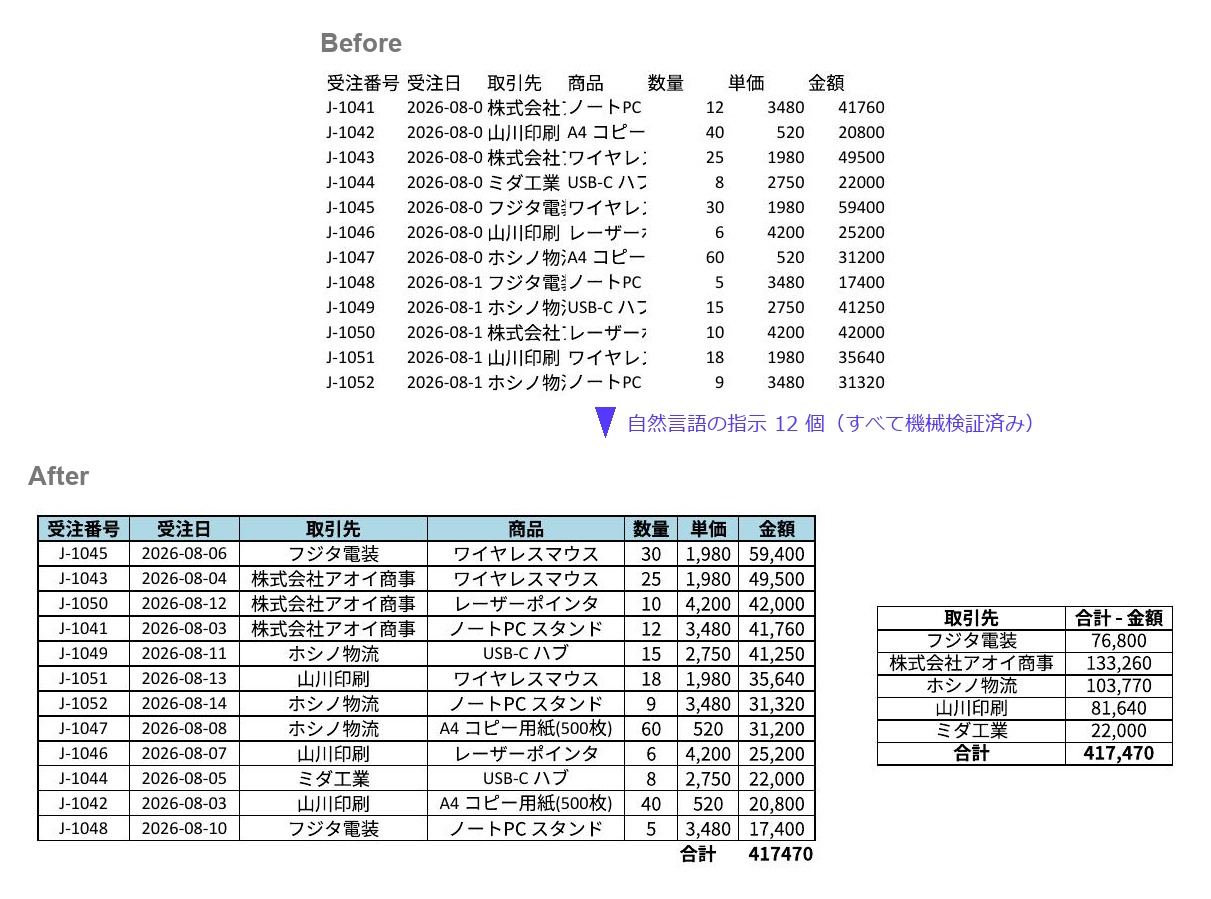
Before (top) is the input — an unformatted order ledger with fictional sample data. 12 natural-language instructions later it became After — sorted by amount, a total row (the machine states which row it verified), bold light-blue headers, thousands separators, borders, auto-fit columns, centered cells, and a per-client summary sheet. Every step was read back and machine-verified. No Excel involved
Having an AI write and run code is not enough on its own. Code that prints “it worked” prints it even when it did nothing. In practice it prints “loaded / ran / saved” without a single error, and not one cell has changed.
So ailine reads the document back before and after, and diffs it. Values, formatting, colors, borders, merges, column widths, sheets, charts: if nothing changed, it treats that as “did nothing” and rewrites. Not “it ran,” but it actually changed, confirmed by machine, and only then is the diff shown to a human.
“Sort by amount, descending.” The local AI translates it into LibreOffice code.
Changes go to the original with an automatic backup and undo
(--copy edits a copy instead). Anything that would overwrite existing data
asks before it is applied. The format stays .xlsx.
Read back and diff. If nothing changed, rewrite. Ran is not done, caught by machine.
Arcane operations (sorting, charts, pivots, VLOOKUP) are not written from scratch. The model calls verified building blocks instead. Accuracy goes up, and the user never needs to know the internal names.
The images below were all made from a single plain-language instruction, then rendered and checked by the AI. A value being correct and how it looks being correct are two different things, so the AI confirms how it looks as well.
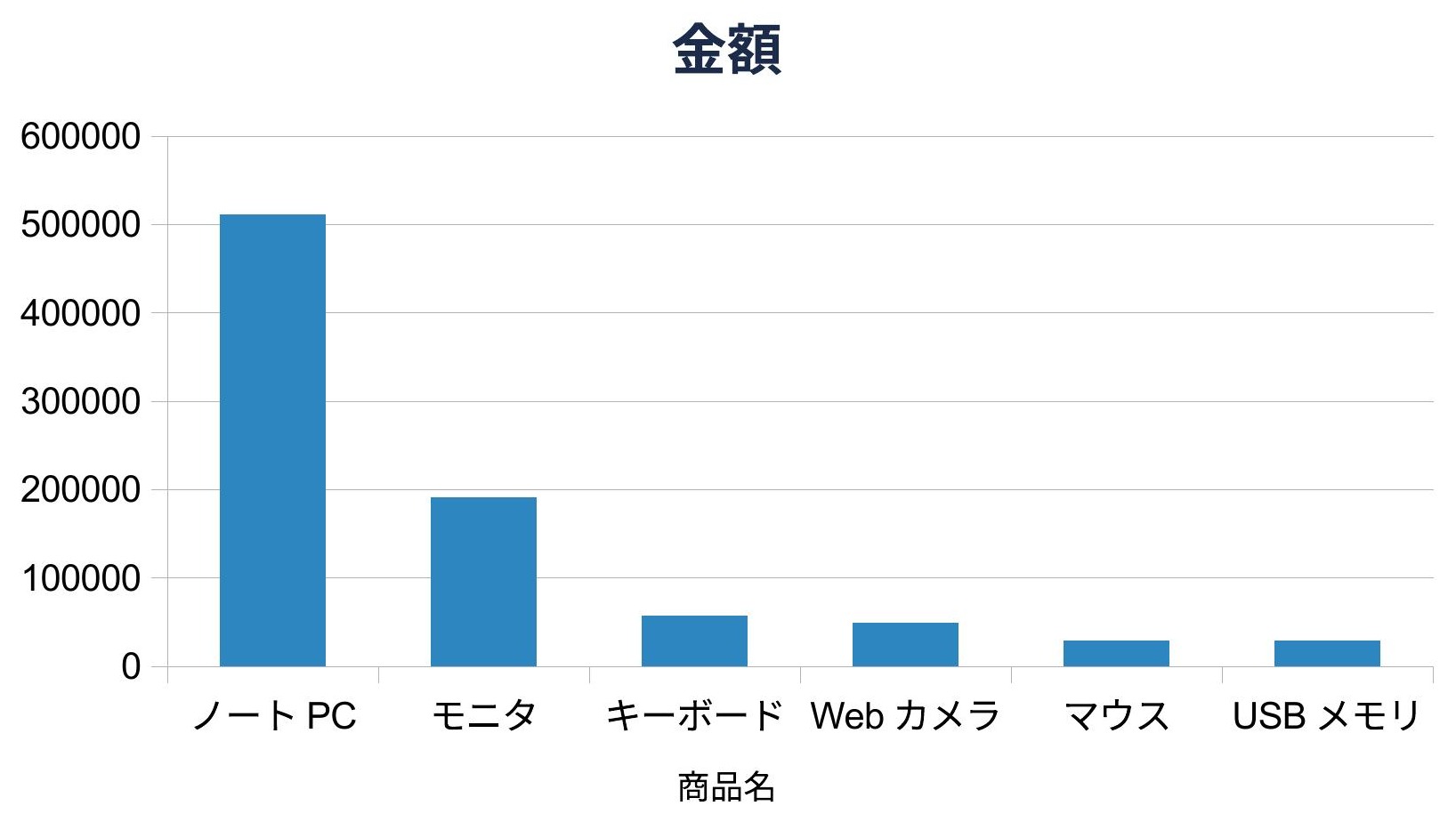
“Make a bar chart of the amounts.” Title and axis derived from the headers. A real LibreOffice chart.
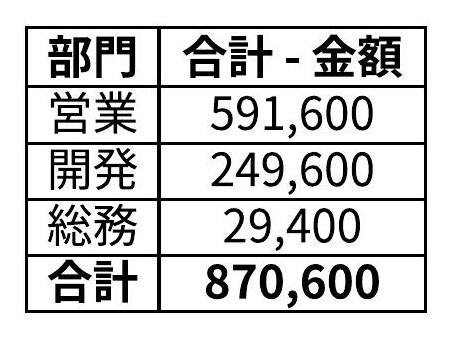
“Summarize the amounts by department.” A clean table with borders, commas and a total. It can also generate a real DataPilot pivot.
Even a small local model (qwen2.5-coder:7b) writes values, logic, and formatting
almost first-try. The hard parts are covered by verified building blocks, and
no data ever leaves your machine.
Forty invoice files. You want just the rows that match a condition, collected into one book ― one sentence does it. Originals are read-only (not a single byte changes). Files it could not read and values that look wrong are called out by name, never silently skipped. Everything below is the actual run, unedited (all data is fictional sample data; the tool's output is in Japanese).
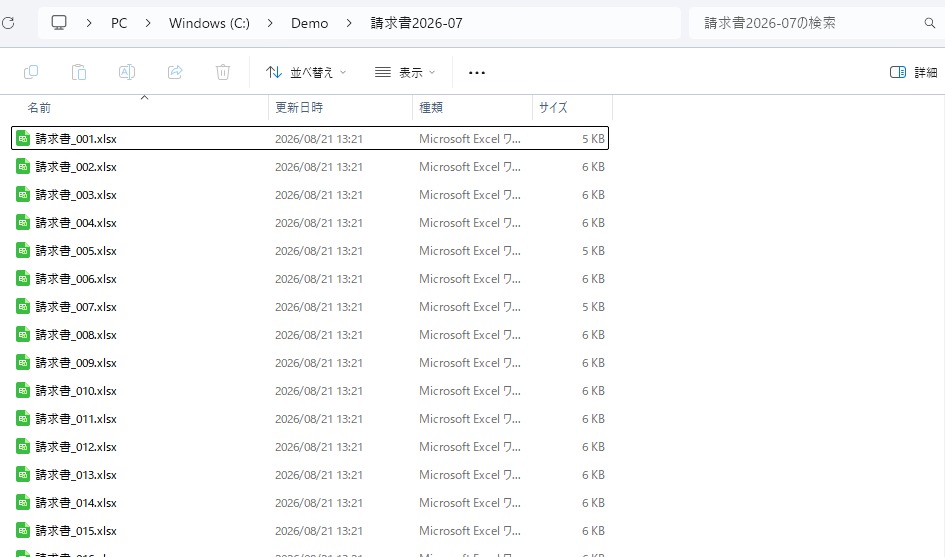
A familiar sight ― a folder of invoices. Instead of opening them one by one, you ask about the whole folder
> python ailine.py run 請求書2026-07 "金額が40000以上の行を抜き出して"

■ ailine run(フォルダ抽出)  folder=C:\Demo\請求書2026-07
出力先: C:\Demo\請求書2026-07_金額40000以上.xlsx
条件: 金額 40000 以上
40 ファイル中 38 照合 → 38 中 32 ファイルで計 60 行一致
  ⚠ 請求書_007.xlsx: 取れなかった(欠け: 金額)── 中身の検査は未実施
  ⚠ 請求書_031.xls: 取れなかった(旧形式(.xls))── 中身の検査は未実施
  並べ替えて照合: 4 冊(内訳は --json)
  合計行 76 行を 38 冊で除外(内訳は --json)
  ⚠ 請求書_023.xlsx: 合計行(8行目) の値 140100 ≠ 明細の和 138600
  行の完全会計: 38 冊すべてで成立(データ行 = 一致 + 不一致 + 合計行の除外・内訳は --json)
出力データ行数: 60
Σ金額: 元 4701000 / 出力 4701000
Out of 40 files: 2 unreadable ones are named, with reasons. In file #23 the total row does not match the sum of its line items ― shown with both numbers. A bookkeeping mistake a human had missed, caught by the tool.
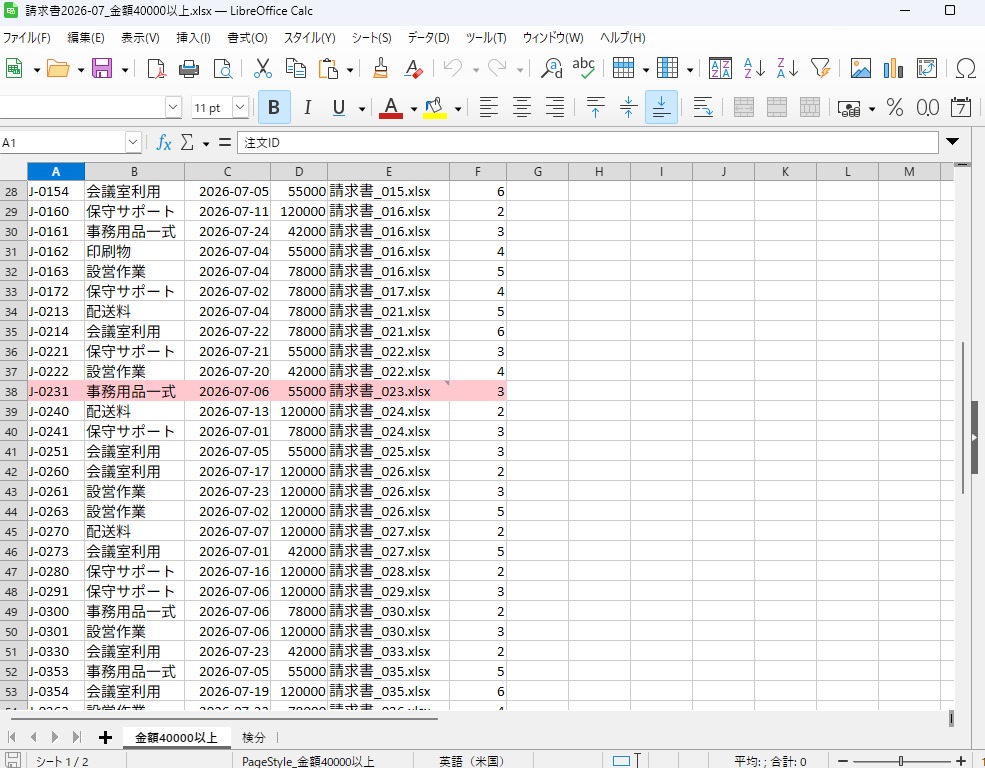
The output book, opened in LibreOffice. Rows from the suspicious file are light red; the rightmost provenance columns (source file, source row) let you audit any row back to its origin ― and the bundled inspection sheet is right there as a tab at the bottom

A bundled inspection sheet lists every finding down to which file, which sheet, which cell ― with clickable links straight to the source cell. Hand this book over, and the verification record travels with it
And if someone hand-edits the file after delivery? ― re-run just the verification, standalone.
> python ailine.py verify 請求書2026-07_金額40000以上.xlsx 請求書2026-07

■ ailine verify  out=C:\Demo\請求書2026-07_金額40000以上.xlsx  folder=C:\Demo\請求書2026-07
行数: 元 60 / 出力 60
Σ金額: 元 4701000 / 出力 4624000
⚠ 金額 の合計が一致しません: 元 4701000 / 出力 4624000
⚠ 帰属が一致しません: 請求書_002.xlsx の 4行目 列『金額』 元 120000 / 出力 43000
A single edited cell is pinned down to which file, which row, which column, and both values (the exit code tells machines, too). What you trust shifts from the tool to the verification
All you need is a local LLM (ollama) and LibreOffice. No Microsoft Office, no cloud API. The model is swappable.
# natural language, generate, apply (backup + undo), verify the effect, show the diff
python ailine.py run quote.xlsx "put amount = unit price x quantity in each row"

# generate and show only, without applying (for review)
python ailine.py run quote.xlsx "..." --dry

# swap in another model (to raise the ceiling)
python ailine.py run quote.xlsx "..." --model qwen2.5-coder:32b
Verified helpers take on the hard UNO operations:
sorting, charts, pivots, VLOOKUP, bolding a header. The model only picks “which column and which way,”
and never touches arcane pitfalls like ContainsHeader.
I write down what I've checked and what I haven't, separately. Answering when asked, and writing it up front, do not mean the same thing.
CharWeightAsian, pinned down by measurement). Numbers are not corrupted..xlsx, and undo steps back one change at a time.Excel in 2026 ships with Copilot Agent Mode. If you have Microsoft 365, a Copilot license, and data that may go to the cloud, it is a strong option. ailine answers the same question, driving documents with natural language, under the opposite constraints: for desks where the data must stay on the machine.
Copilot reasons with cloud models. ailine runs on a local LLM only and sends nothing out. Once set up, it runs without any network at all, so it works on air-gapped desks and wherever policy says data must not leave the machine.
Copilot assumes Microsoft 365 plus a Copilot license. ailine runs on LibreOffice and ollama, both free of charge: no Office, no subscription, and no license fees at all. Adoption starts at zero cost.
Copilot shows a plan before it acts and highlights its edits. ailine reads the result back after it acts and verifies, by machine, that the document really changed. Planning ahead and verifying after are different things.
This is not about which one is better. They hold different fields. ailine's field is the desk that cannot reach the cloud.
The heavy part (driving a headless LibreOffice safely) belongs to basrun. What ailine adds is generation from natural language and the layer that reads the result back and verifies it. The time goes into what only becomes possible once they're combined.